
Over the previous parts of this series, I’ve approached the property-maintenance problem from both directions.
First, I looked at existing software. Then I designed the high-level custom system I would build if an organization decided it didn’t need another full property-management platform.
At this point, the custom system can:
-
Receive maintenance requests by email or web form
-
Use AI to understand and categorize them
-
Detect likely duplicate incidents
-
Acknowledge residents
-
Create a maintenance case
-
Recommend the appropriate contractor
-
Put the action in front of a property manager for approval
-
Contact contractors through email or SMS
-
Collect acceptance and ETA information
-
Update affected residents
-
Escalate unanswered or urgent work
-
Retain a complete operational history
So now comes the unavoidable question:
Should we actually build it?
Because “we could build this” and “we should build this” are two very different conclusions.
Start With the Buy Option
For this comparison, I’m going to use Property Meld Core as the commercial benchmark.
I’m not suggesting Property Meld is the only possible choice. Earlier in the series I also looked at Entrata, AppFolio, Building Engines and Zendesk.
Property Meld is useful here because it is specifically focused on maintenance and publishes straightforward per-unit pricing.
As of August 2026, Property Meld lists its Core plan at $1.60 per unit per month, with a $160/month minimum. Property Meld says the product is best suited to management companies with more than 100 units. (propertymeld.com)
Core already includes a substantial maintenance feature set, including conversational AI repair intake, emergency screening, service-issue creation, workflow automation, communications, scheduling and vendor-related functionality. (propertymeld.com)
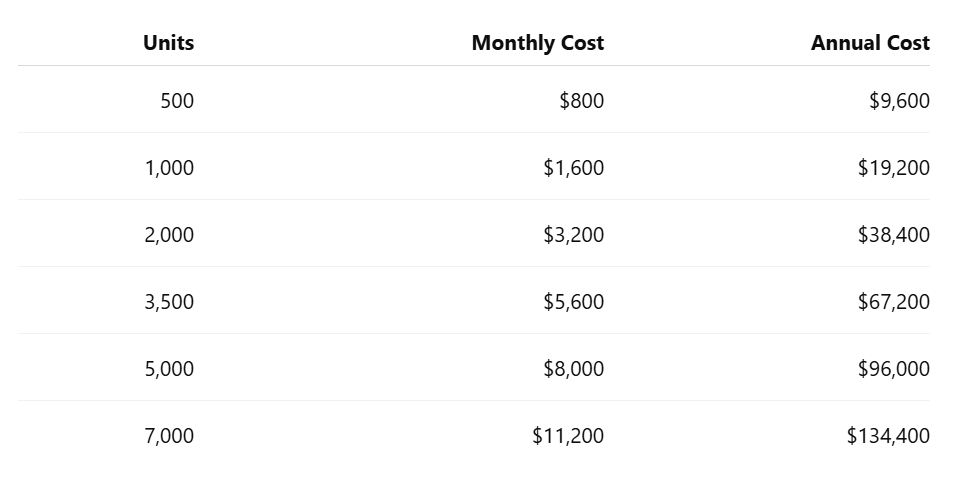
So let’s see what $1.60 per unit looks like at different portfolio sizes.
 One important clarification from the original scenario: I described buildings with more than 350 residents.
Property Meld prices by unit, not by resident.
So a real analysis would require the actual unit count before making any recommendation.
And, as with any published SaaS pricing, I would confirm contract terms, currency, implementation costs and any additional charges directly with the vendor before treating these figures as a formal quotation.
But they’re enough for the exercise.
At 500 units, $9,600 per year looks very different from $134,400 per year at 7,000 units.
Scale changes the economics considerably.
What Would the Custom System Cost?
In the original exercise, I assumed approximately $150 per hour for an experienced developer or consultant.
That assumption is reasonably defensible (and actually might even be on the lower side).
Clutch’s current 2026 pricing data places Canadian custom-software companies at roughly $100–$149 per hour, with rates varying significantly based on expertise, complexity and the type of provider. (clutch.co)
So I’ll continue using $150/hour as a convenient planning rate.
But there is an important problem with saying:
Four months × developer rate = cost of the software.
A software project doesn’t consist only of writing code.
Before anyone writes the first meaningful line of code, someone has to understand the operation.
Discovery Comes First
For this project, I would want to understand things such as:
-
How many maintenance requests arrive every day
-
Which channels they arrive through
-
Which properties generate the most volume
-
How staff classify requests today
-
What constitutes an emergency
-
How contractors are selected
-
What requires management approval
-
What spending limits exist
-
How after-hours requests are handled
-
How residents are currently updated
-
What existing systems need to integrate with the new application
-
What data needs to be retained
-
Who is allowed to see or change what
-
What reporting management actually needs
This isn’t filler work.
If these questions aren’t answered before development, they get answered during development.
That’s usually a more expensive place to discover them.
For planning purposes, I could easily see 40–80 hours of discovery, workflow mapping and requirements work on a project like this.
At $150/hour:
- 40 hours = $6,000
- 80 hours = $12,000
So before the application exists, we may already have:
Discovery / consulting: approximately $6,000–$12,000
Could it be less?
Certainly.
Could a complicated organization with multiple properties, approval chains and existing systems require much more?
Also certainly.
This is why these are planning numbers rather than a proposal.
Then Comes Architecture and Product Design
Someone also needs to translate the operational workflow into a system.
What entities exist?
- Properties.
- Incidents.
- Resident reports.
- Contractors.
- Work orders.
- Users.
- Approvals.
- Messages.
- Status changes.
- Escalations.
- Attachments.
- How do they relate?
- What does the property manager see?
- What happens if the AI is uncertain?
- What happens when email delivery fails?
- What happens when a contractor clicks an expired link?
- What happens when two employees try to approve the same request?
- What happens when an incident originally classified as Routine suddenly receives a report suggesting a safety issue?
Those decisions become the architecture.
A relatively lean architecture and UX/design phase might represent another 40–80 hours.
At $150/hour:
Architecture / workflow / UX design: approximately $6,000–$12,000
Again, one person may perform both discovery and architecture. The point isn’t that every project needs separate consultants billing separate invoices. The point is that the work exists whether you put a separate line item beside it or not.
Now We Can Build
In my original estimate, I assumed roughly three to four months of full-time development.
A standard 40-hour week gives us:
- 12 weeks = 480 hours
- 13 weeks = 520 hours
- 16 weeks = 640 hours
- 17 weeks = 680 hours
At $150/hour:
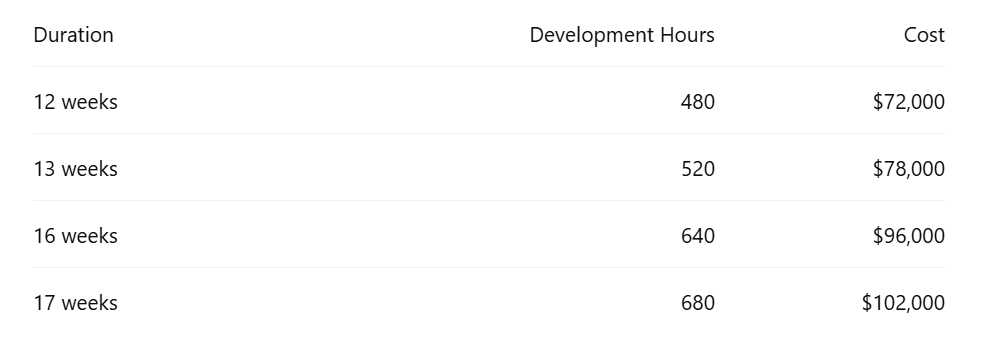
So the original estimate of approximately $75,000–$105,000 for development still seems like a reasonable planning range for a serious first version.
But there’s a caveat.
If one solo developer is also doing discovery, architecture, UX, QA, deployment and training during those same three or four months, then those tasks have to come out of the development hours.
That’s possible for a tightly scoped MVP.
For a polished production implementation, I would be more conservative.
What About Testing and Implementation?
Consider what needs testing:
-
inbound email
-
web requests
-
attachments
-
AI extraction
-
duplicate detection
-
permissions
-
approvals
-
email
-
SMS
-
contractor links
-
escalation rules
-
failed API requests
-
audit history
-
notifications
-
mobile interfaces
-
multiple properties
-
concurrent users
-
security controls
Then the system has to be deployed:
- Existing property and contractor data may need to be imported.
- Email addresses need to be configured.
- Users need accounts and permissions.
- Contractor rules need to be loaded.
- AI prompts and classification rules need to be tuned.
- Production monitoring needs to be configured.
A budget of perhaps 80–160 additional hours for dedicated QA, deployment and implementation work would not strike me as unreasonable.
At our planning rate:
Testing / implementation: approximately $12,000–$24,000
Some of that work may already be included in the developer’s original estimate. Again, don’t add these numbers mechanically and pretend we have created a quote. I’m trying to show the work that needs to occur.
And People Need to Know How to Use It
The software also has to enter an actual organization.
That means:
-
Administrator setup
-
Property configuration
-
Contractor configuration
-
Staff training
-
Documentation
-
Initial workflow adjustments
-
Support during rollout
Perhaps that takes 16–40 hours.
At $150/hour:
Training / rollout support: approximately $2,400–$6,000
Now we’re getting closer to the real implementation cost.
A More Honest Initial Cost Range
Put those planning ranges together and the project might look something like this:
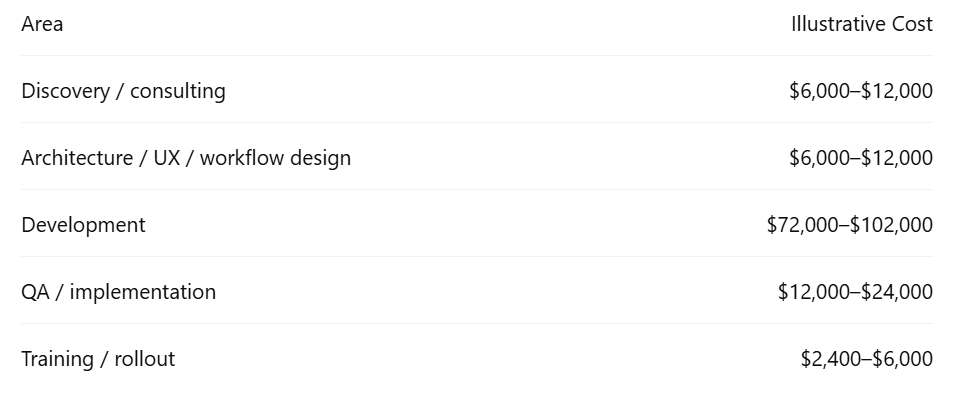
If every item were billed separately, that produces a theoretical range of roughly:
$98,000–$156,000
But I wouldn’t tell a client:
“Your system will cost $156,000.”
Not from this level of analysis.
There will almost certainly be overlap.
- A good developer may perform architecture while building.
- Testing occurs throughout development.
- Discovery may happen quickly if the organization has very clear processes.
- A consultant/developer working solo may perform several roles.
- So I would probably characterize this more cautiously:
A serious custom implementation could plausibly require an initial investment somewhere around $100,000–$150,000, depending heavily on scope, integration requirements and how much work the organization can perform internally.
A deliberately smaller MVP could cost substantially less.
What Would I Leave Out of the MVP?
This is where I would control cost. Version one doesn’t need every idea from this series.
I would probably start with:
-
inbound email
-
simple web intake
-
AI categorization
-
property identification
-
duplicate detection
-
maintenance queue
-
contractor directory
-
human approval
-
AI-generated contractor emails
-
resident acknowledgements
-
basic status updates
-
audit trail
-
basic reporting
Then ask:
Did this actually reduce work?
Only after proving that would I add things such as:
-
SMS
-
sophisticated contractor response links
-
advanced escalation
-
contractor scorecards
-
predictive analytics
-
detailed AI reporting
-
mobile applications
-
more advanced integrations
That’s an important advantage of custom development. You don’t have to build everything. But it’s also one of its biggest risks.
Every new:
“Wouldn’t it be cool if…”
has a price attached to it.
Custom Software Doesn’t Stop Costing Money After Launch
This is the part that often disappears from build-versus-buy comparisons. A SaaS subscription looks expensive because the annual bill is visible. Custom software can appear cheaper because most of its future costs are invisible during the buying decision.
But the system still needs:
-
bug fixes
-
security updates
-
operating-system and framework upgrades
-
database maintenance
-
cloud infrastructure
-
monitoring
-
backups
-
email delivery
-
SMS
-
AI API calls
-
changing vendor APIs
-
enhancements
-
user support
ScienceSoft, for example, uses a planning estimate of roughly 15–20% of original development cost per year for software maintenance and support. (scnsoft.com)
That isn’t a universal law, however a stable internal application may cost less. That said, an aggressively evolving application may cost considerably more.
But it’s a useful reminder that:
Build cost ≠ ownership cost.
If our initial custom implementation cost $120,000 and we used 15–20% as a planning allowance, ongoing software maintenance alone might be approximately:
$18,000–$24,000 per year
before some infrastructure and consumption costs.
Then There Are Usage Costs
Our custom system uses services that aren’t free.
Depending on the architecture, those may include:
AI
Every maintenance request sent to an AI model consumes tokens or another unit of API usage.
At the scale we’re discussing, the raw AI cost may be surprisingly modest compared with human labour, but it still belongs in the model.
Inbound and outbound email may use a provider such as SendGrid, Mailgun, Amazon SES or another transactional email service.
SMS
Text messages generally have a direct per-message cost.
Hosting
- Application servers.
- Databases.
- File storage.
- Backups.
- Monitoring.
- Logs.
Security
Periodic security review, dependency updates and perhaps external testing.
None necessarily destroys the economics of custom software.
But they should be counted.
Now Compare Three Years
Let’s use a hypothetical 3,500-unit portfolio. Property Meld Core at the currently published $1.60/unit/month works out to:
- $5,600 per month
- $67,200 per year
and, assuming pricing remained unchanged:
$201,600 over three years
Now let’s construct a deliberately simple custom example.
Suppose:
- Initial implementation: $120,000
- Ongoing maintenance/support: $21,000/year
- Hosting, AI, messaging and other infrastructure: perhaps $5,000/year for illustration
Three years could look approximately like:
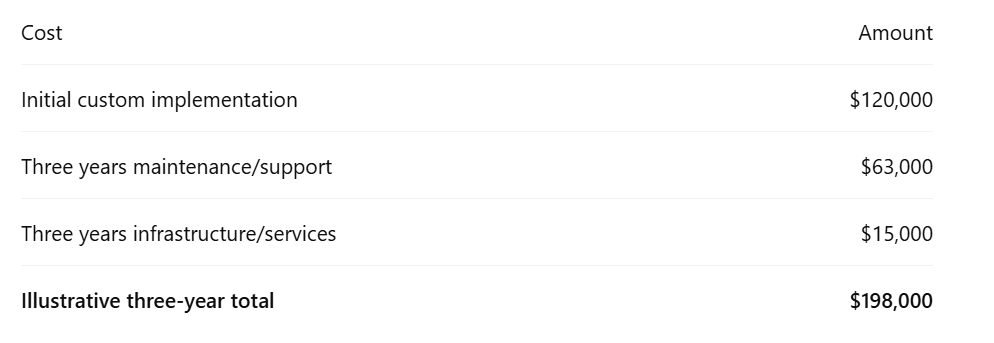
Interesting.
On paper, those numbers are almost identical.
But that does not mean:
“Custom is better.”
Because we’re still missing the most important part of the comparison.
These Aren’t the Same Product
A $120,000 custom maintenance application is not Property Meld.
Property Meld has spent years building a mature commercial platform.
Its Core product already includes capabilities beyond the narrowly scoped system I’ve described. Its broader product lineup adds even more functionality. (propertymeld.com)
So it would be misleading to write:
Property Meld costs $201,600 over three years while we can build the same thing for $198,000.
We aren’t building the same thing. Our custom application might deliberately have far fewer features.
And that may be completely fine.
The real question is:
How much of the commercial product does the organization actually need?
If the property-management company will use 80% of what Property Meld offers:
Buy it.
Building a smaller imitation just to avoid the subscription probably makes very little sense.
But suppose the organization only needs 20% of the functionality. And suppose that 20% solves 90% of its actual operational pain. Then paying for a narrowly scoped custom workflow starts becoming more interesting.
That’s the real build-versus-buy calculation.
Portfolio Size Changes the Answer
Consider our Property Meld Core examples again.
500 units
Approximately $9,600/year.
It is difficult to make a purely financial argument for spending $100,000+ building custom software to avoid a $9,600 annual subscription.
1,000 units
Approximately $19,200/year.
Custom still requires a fairly long financial horizon to justify itself strictly through avoided licensing.
3,500 units
Approximately $67,200/year.
Now the economics become more interesting.
5,000 units
Approximately $96,000/year.
At this scale, a custom workflow deserves serious analysis if the organization genuinely needs only a relatively small portion of the commercial platform.
7,000 units
Approximately $134,400/year.
At that point, even a substantial custom development project may deserve consideration.
But this still isn’t enough information to make the decision.
Because we’re comparing software costs without looking at the cost of the problem.
What Does Doing Nothing Cost?
This may be the most important number in the entire analysis.
Suppose several employees collectively spend six hours every business day:
-
reading maintenance emails
-
categorizing them
-
figuring out which property they’re about
-
forwarding them
-
contacting contractors
-
sending updates
-
chasing responses
-
finding old messages
-
dealing with duplicate reports
Six hours per day across five working days is:
30 hours per week
Over 50 working weeks:
1,500 staff hours per year
That’s the workload already hiding inside the current process. In the original article, that was exactly the point: before judging whether a software cost is large, we need to understand what the existing operation costs.
Suppose automation removed even half of that work.
That’s 750 hours returned to the organization every year.
Now the conversation changes.
We’re no longer asking:
“Does this software cost $67,000?”
or:
“Does it cost $120,000 to build?”
We’re asking:
What does the current process cost, what does each alternative remove, and what additional value does each one create?
That’s how I would approach the business case.
There Is Also Risk on Both Sides
Buying has risks.
The vendor can:
-
increase pricing
-
change features
-
change its product direction
-
discontinue integrations
-
alter contract terms
You also adapt some of your processes to the software.
But building has risks too.
You become responsible for:
-
the code
-
security
-
support
-
uptime
-
integrations
-
technical debt
-
future enhancements
-
retaining people capable of maintaining it
A SaaS subscription buys more than software.
It also transfers responsibility.
That has value.
And There Is a Third Option
So far I’ve framed this as:
Build versus buy.
But that’s not actually the entire decision.
There is a third possibility:
Integrate
Maybe the organization already has a property-management platform it likes.
Maybe it already has a service platform.
Maybe it only needs:
AI intake + workflow + integration
rather than an entirely new maintenance system.
For example, perhaps the organization can combine:
- Existing property-management system
- Existing customer-service/ticketing system
- A narrow AI orchestration layer
That could cost dramatically less than replacing the entire software stack or building every component ourselves.
And that leads directly to the final part of this series.
So Which Would I Choose?
Not yet.
At this point, we know:
- Buying can be inexpensive at smaller portfolios and increasingly significant at scale.
- Building provides control but creates its own development and ownership costs.
- Commercial and custom products are not automatically equivalent.
- The existing manual process has a cost that also needs to be included.
And there may be a third path:
Integrate what already works.
So in the final part, I’ll bring the entire series together.
Instead of asking simply:
Build or buy?
I’ll ask:
Buy, Build, or Integrate?
And I’ll lay out the conditions under which I would choose each one.